
for Microsoft© Access 2007/2010/2013/2016+
New BETA 3 version - Last Update 05 November 2014
A Fast and Easy Way to build and manage Access Custom Ribbons
Download the fully functional unlimited BETA 3
Build Date 05 November 2014 - Uninstall previous versions/updates before installing.
NB: THIS IS BETA APPLICATION PROVIDED WITHOUT WARRANTY OF ANY KIND WITH NO SUPPORT PROVIDED
| Troubleshooting the MSCOMCTL.OCX Control The Builder uses the MSCOMCTL.OCX control library and on some Windows installs there is a system issue that prevents use of the Treeview control in the app. If you on opening the Builder get an On Load Error message that the Locked property of an object is not supported, close the Builder and apply the fix for your version of Windows and Access as set out here: Fixing the Microsoft Windows Common Control Library (MSCOMCTL.OCX) Security Update - http://www.fmsinc.com/microsoftaccess/controls/mscomctl/ |
[The free Instant Ribbon Wizard builds a Ribbon switchboard in just two clicks from the native Access Switchboard Items table, and you can open the XML file created by the Wizard in the Builder and use it as a quick start template.]
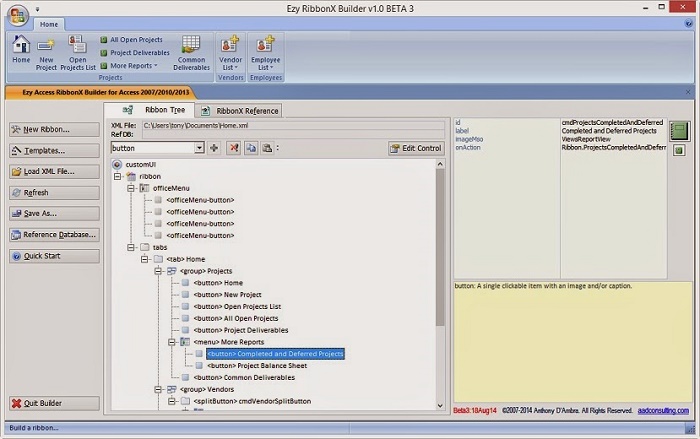
Ezy Access RibbonX Builder for Access is a basic yet sophisticated tool for building custom ribbonbars using XML files. Not all controls can be edited, and only sub-set of essential attributes for custom controls can be edited. Only native Office msoImages can be assigned to custom controls.
The ribbon being built is displayed as the active RibbonBar. You use the treeview representation of the ribbon to navigate and build the ribbon by adding, editing, copying, pasting, and deleting controls.
File commands:
Load XML File... Loads an existing XML ribbon file. The full file path is displayed in the XML File textbox.
Refresh Reloads the current XML file and refreshes the displayed ribbon.
Save As... Saves the current XML file for the displayed ribbon as another file.
Ribbon commands:
Edit Control Displays an Edit Control tab where you can edit the attributes of the control selected in the treeview.
New Ribbon... Load a new ribbon stub and creates a new XML file for the ribbon.
Reference Database... Assigns a database file to populate the onAction combobox for that ribbon control with a macro action from a macro named 'Ribbon'. The full file path is displayed in the Ref DB textbox.
Templates... Select a ribbon template from the samples shipped with the Builder.
Other functions:
Control objects combobox Select a control from this combobox to add to the displayed ribbon. Clicking the + button adds the selected control: if the + button is disabled then the selected control cannot be added to the current parent (container) control. The buttons to the right of the + button from left-to-right delete, copy, or paste the control currently selected in the treeview. The name of a copied control that has not yet been pasted is displayed in a label between the Paste and the Edit Control buttons.
Lookup Office Image panel The functions in this panel allow you to assign images to custom ribbon controls during editing. Place your mouse over a control in this panel for details of the function performed